The basic keystrokes of Lost Saga. A, S, D, arrow keys.It is possible, and there are shortcuts for each additional function for convenience.
You can change the key setting individually in the option (F8).
1. Basic operation key
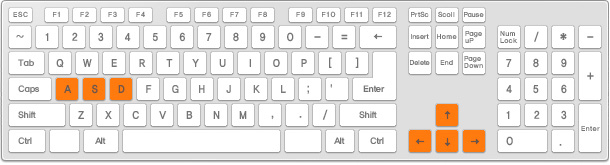
- Key A : Used to jump, or pick up an item.
- S key : Do defense.
- D key : Attack the other side.
- Arrow : Moves in the direction of pressing or triggers a dash.
2. Additional Operation Key
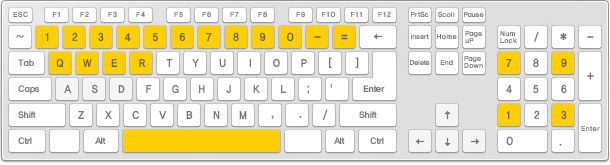
- Number keys (1 to 0,-, =) : Replace with the mercenary corresponding to the number.
- Q, W, E, R : If it is difficult to press multiple keys at the same time, you can use those keys to use the skill.
- Space Bar : Replace with the mercenary corresponding to the number.
- NumerPad 1, 3, 7, 9 : It is possible to move and dash diagonally.
3. Other useful shortcuts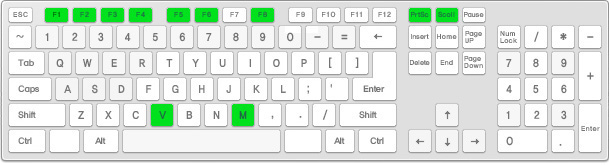
- F1 / F2 / F3 / F4 : Target/Store/My Items/Stacker
- F5 / F6 / F7 / F8 : Mission/Mini Home/Pet/Option
- V key : Voice Chat On/Off
- M key : Messenger
- Prt Scr (Print Screen) : Screenshots
- Scroll Lock : Video start/end
- Page Up / Page Down : Zoom Out/Zoom In